How Does FRED Add New Data?
What Does FRED Do To Ensure It Publishes Data Accurately?
How Does FRED Update Its Database?
How Can I Navigate to the Originating Source of the Data?
How to Find More Information About the Data?
What is the Date Format?
What Formulas are Used to Calculate Growth Rates?
What Dates Are Used for the U.S. Recession Bars?
What is Frequency Aggregation?
How are Missing Values Determined for First/Last Observations?
How are Missing Values Treated in Average, Sum, and End of Period Aggregation Methods?
How are Data Aggregated When Periods Overlap?
How is the Number of Decimal Places Determined for Aggregated Values?
What is the Order of Processing in FRED Graph?
Change the Time Range
Edit a Data Series: Units
Format the Graph and Line Settings
Edit a Data Series: Frequency
Edit a Data Series: Frequency Aggregation
Add a Data Series to Graph
Remove a Data Series from Graph
Customize Data, Add Series to Existing Line
Add User Defined Straight Line to a FRED Graph
How Does FRED Add New Data?
What Does FRED Do To Ensure It Publishes Data Accurately?
How Does FRED Update Its Database?
Save Your Graphs
FRED in Action Videos
Contact Us
Sharing Options
Embedding FRED Graphs on Your Website or Blog
What is the Date Format?
What Formulas are Used to Calculate Growth Rates?
What Dates Are Used for the U.S. Recession Bars?
Add a Data Series to Graph
Cite the Data
Customize Data, Add Series to Existing Line
Add Your Saved Map to a Dashboard
How Does FRED Add New Data?
What Does FRED Do To Ensure It Publishes Data Accurately?
How Does FRED Update Its Database?
How Can I Navigate to the Originating Source of the Data?
How to Find More Information About the Data?
What is the Date Format?
What Formulas are Used to Calculate Growth Rates?
What Dates Are Used for the U.S. Recession Bars?
What is Frequency Aggregation?
How are Missing Values Determined for First/Last Observations?
How are Missing Values Treated in Average, Sum, and End of Period Aggregation Methods?
How are Data Aggregated When Periods Overlap?
How is the Number of Decimal Places Determined for Aggregated Values?
What is the Order of Processing in FRED Graph?
Change the Time Range
Edit a Data Series: Units
Format the Graph and Line Settings
Edit a Data Series: Frequency
Edit a Data Series: Frequency Aggregation
Add a Data Series to Graph
Remove a Data Series from Graph
Customize Data, Add Series to Existing Line
Add User Defined Straight Line to a FRED Graph
How Does FRED Add New Data?
What Does FRED Do To Ensure It Publishes Data Accurately?
How Does FRED Update Its Database?
Save Your Graphs
FRED in Action Videos
Contact Us
Sharing Options
Embedding FRED Graphs on Your Website or Blog
What is the Date Format?
What Formulas are Used to Calculate Growth Rates?
What Dates Are Used for the U.S. Recession Bars?
Add a Data Series to Graph
Cite the Data
Customize Data, Add Series to Existing Line
Add Your Saved Map to a Dashboard
To add your saved map to a dashboard, sign into your FRED account. From the “My Account” dropdown, select “Dashboards.” This will filter your results to show the names of your saved dashboards (which will display below your categories).

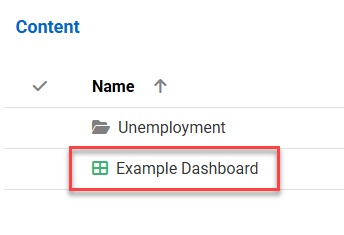
Click on the dashboard that you would like to add your map to, then click on the “Add Widget” button.

Click on the “Map” button and a list of your saved maps will display.


Click on the map of your choice and the selected map title will display, then click on the “Add Widget to Dashboard” button and the map will be added to the dashboard.
